Free
$0
- Up to 4 sessions open at once
- Live status, sidebar and status bar
- Session browser and search
- Broadcast to several panes
- Usage limits
- Loop and stall alarms
For Claude Code · in VS Code and Cursor
Paneherd opens your Claude Code sessions side by side as a grid of terminals, collects every permission prompt in one inbox, and asks before two agents edit the same file.
Free for up to 4 sessions at once.
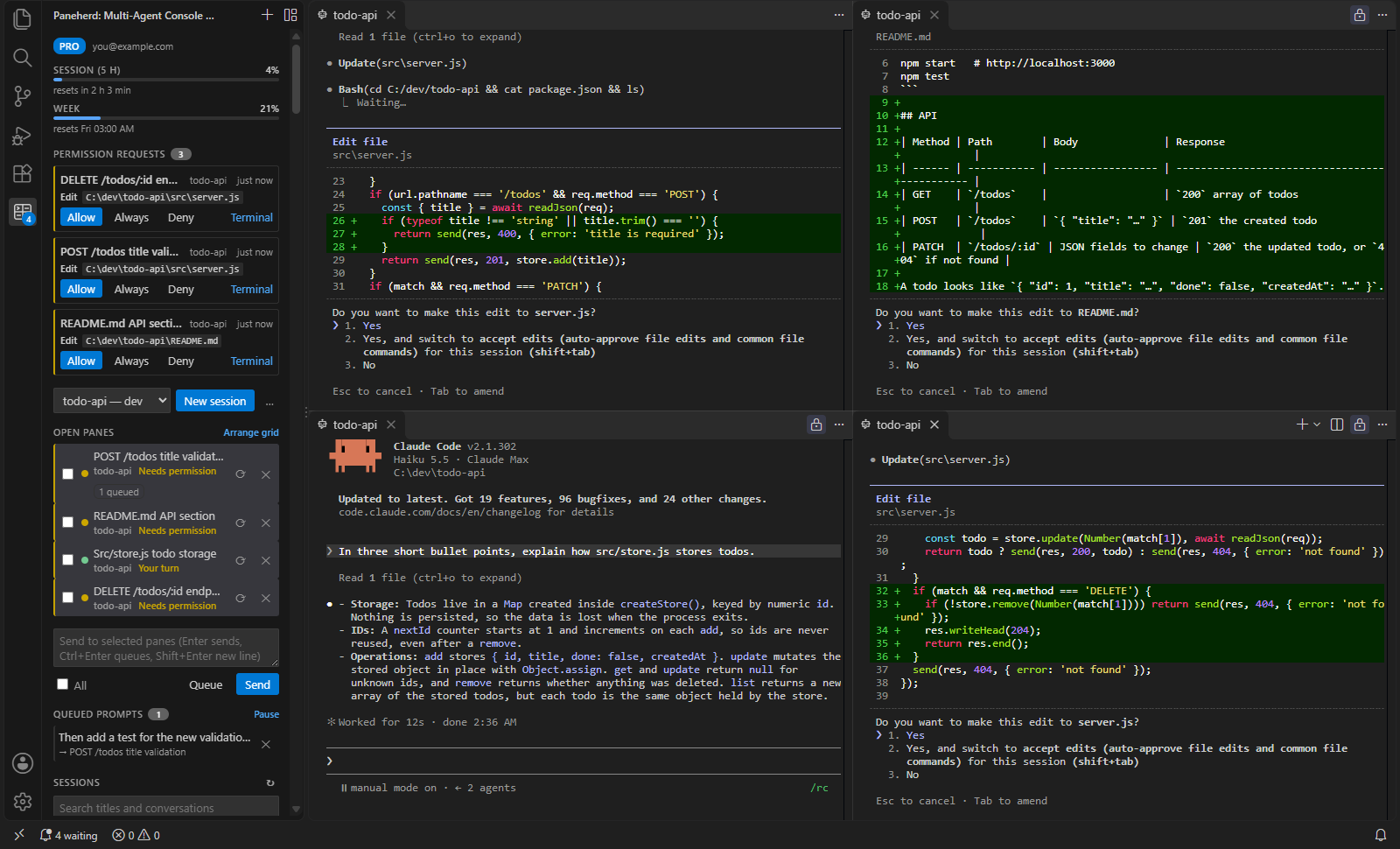
01 · Grid
New sessions and resumed conversations open as real terminals in the editor area, laid out in a grid of up to four columns. One command tidies them up again.
02 · Status
Each pane shows Working, Needs permission, Has a question or Your turn, straight from Claude Code’s own hook events rather than guesses about terminal output. Panes that need you are counted in the sidebar and the status bar, and one command jumps to the next.
03 · Permission inbox Pro
Permission prompts from all panes collect in the sidebar, with the command, file or URL in question. Allow, Always, or Deny there. Claude’s own dialog stays open in the pane, and whichever you answer first wins.
04 · Conflict guard Pro
Before a pane edits a file that another open pane changed in the last ten minutes, Claude stops and asks you, and the inbox says which pane changed it. Changes made through shell commands are not detected.
05 · Task queue Pro
Queue a prompt instead of sending it. The first selected pane to finish its turn takes it, so prompts for one pane run one after another, and prompts for several panes are shared out among them.
06 · Usage
The top of the sidebar shows how much of your plan’s five-hour session and weekly limit you have used, and when each resets. Claude Code reports these on Pro and Max plans.
07 · Alarms
A pane that repeats the same tool call, fails several calls in a row, or goes silent while working is flagged in the sidebar.
08 · Broadcast
Send one prompt to any set of panes. Multi-line text arrives as a single paste, and a pane that is still starting gets it once its prompt is ready.
09 · Sessions
Browse and search all your saved Claude Code conversations by title, prompt, folder, or what was said in them, and resume any of them in a pane. After a reload, the panes you had open are offered back.
$0
Pay once
$29 one-time
Pro is not on sale yet. Follow the GitHub page to hear when it opens.
VS Code 1.95 or later, or Cursor; the Claude Code CLI, signed in; and curl, which ships with Windows 10 and later, macOS and most Linux distributions. Paneherd runs Claude Code for you. It does not provide access to Claude.
Open one terminal per session and start claude in each; give sessions that change code their own git worktree (claude --worktree) so they do not edit the same checkout. Paneherd does the terminal part for you in VS Code and Cursor: New Session opens each one as an editor-area terminal and lays them out in a grid, and the sidebar shows which session is working and which is waiting for you.
Yes. Paneherd is a regular VS Code extension and runs in VS Code 1.95 or later and in Cursor and other editors built on VS Code. It is on the Visual Studio Marketplace.
Yes, for up to four sessions at once, with live status, the session browser, broadcast, usage limits and loop alarms. Pro adds unlimited sessions, the permission inbox, the conflict guard, the task queue and notifications.
Anthropic’s tools show the status of your sessions, run several in tabs or in agent view, queue a prompt within a session, and can start sessions in worktrees. Paneherd adds what they do not: one inbox that answers permission prompts from every session, a guard that asks before two sessions edit the same file, sending one prompt to many sessions, and sharing a queue of prompts out among several sessions.
No. It is an independent product that works with the Claude Code CLI you already use.